Image Color Picker
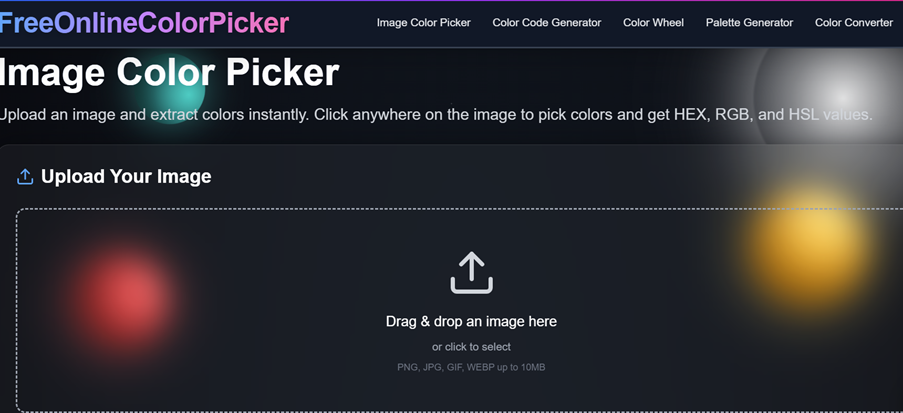
Upload an image and extract colors instantly. Click anywhere on the image to pick colors and get HEX, RGB, and HSL values.
Upload Your Image
Drag & drop an image here
or click to select
PNG, JPG, GIF, WEBP up to 10MB
Free Online Image Color Picker: Extract HEX, RGB, and HSL Codes From Any Image
A single screenshot can hold the answer to a styling question that would otherwise take an hour of trial and error. This page explains how to turn that screenshot, photo, or exported mockup into exact color values you can paste into real work. Our image color picker reads the pixel under your cursor and reports its hex color picker value alongside RGB and HSL, so you spend your time building instead of guessing. The tool runs in the browser, asks for no sign-up, and keeps your files on your own device.
Table of Contents
- What Is an Image Color Picker?
- How to Use the Image Color Picker
- Why Extract Colors From Images?
- Supported Formats and Best Practices for Accuracy
- Use Cases
- Features
- Comparison With Other Tools
- Frequently Asked Questions
What Is an Image Color Picker?
An image color picker is a browser tool that samples the color of one point inside a picture and reports it as a code you can reuse. Think of a digital image as a tightly packed grid of tiny squares called pixels. Each pixel carries three numbers, one for red, one for green, and one for blue, with every channel running from 0 to 255. Those numbers describe how much of each primary light the pixel emits, and together they define a single, specific shade.
When you point at a spot in the image, the tool looks up the pixel sitting at those coordinates and reads its three channel values. To act as a color picker from image data, it then rewrites those raw numbers into the notations designers and developers actually type. A pixel measured at red 37, green 99, blue 235 becomes the hex string #2563EB, the RGB value rgb(37, 99, 235), and the HSL value hsl(221, 83%, 53%). The underlying color never changes. Only the way it is written down changes, which lets you carry one shade across tools that each expect a different format.
This matters because human eyes are poor at naming colors from memory. Two blues that look identical on a wall can differ by twenty points in a channel, and that gap is enough to make a button look wrong next to a brand logo. Reading the stored value removes the guesswork. Instead of describing a shade as "a slightly muted teal," you record a precise color code from image data that anyone can reproduce on any screen.
How to Use the Image Color Picker
The workflow below moves from a blank screen to a finished set of color codes. Each step is short, and none of them require design experience. Follow them in order the first time, and afterward you will likely complete the whole sequence in well under a minute.
Step 1: Open the Tool
Load the page in any current browser on a phone, tablet, or computer. The workspace appears right away, with no setup screen, no email prompt, and no plugin to enable. Because everything runs as an online color picker, you can return to it from a shared machine or a locked-down work laptop where installing software is not an option. The layout adjusts to the width of your screen, so the controls stay reachable whether you arrive on a desktop monitor or a handset.
Step 2: Add Your Image
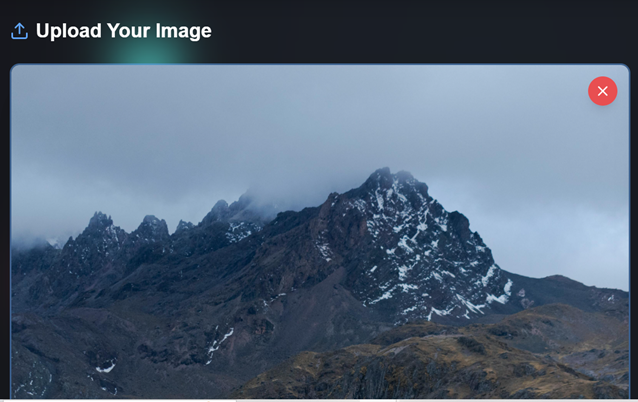
Drag a file onto the drop area, or click to browse your device and select one. The tool reads the picture into your browser and draws it on a canvas at a comfortable viewing size while keeping its original proportions. Nothing leaves your machine during this step, since the file is decoded locally rather than sent to a server. A clear, well-lit source gives the cleanest readings, so a high-resolution screenshot or an unfiltered photo works better than a heavily compressed thumbnail.
Step 3: Hover, Zoom, and Click to Sample
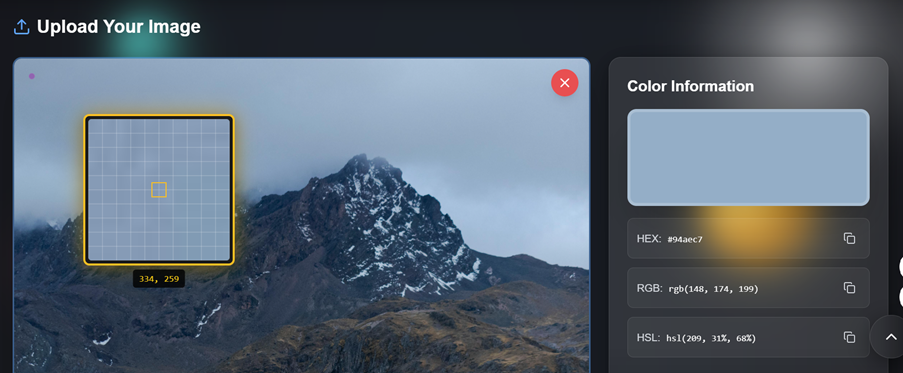
Move your cursor across the image. A magnified loupe follows along and enlarges the area beneath the pointer, separating pixels that look merged at normal size. This zoom view is what lets you pick color from image regions that sit inside a gradient, a shadow, or a busy texture without grabbing a neighboring shade by mistake. When the loupe centers on the pixel you want, click once. The tool reads that exact point and reports its value immediately.
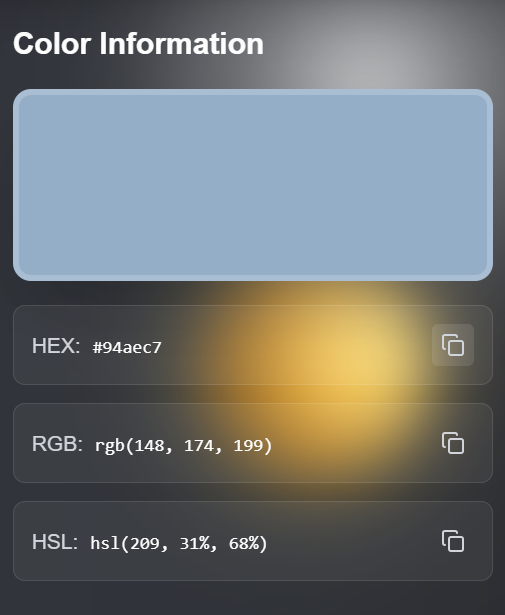
The result appears in three notations at the same time so you can get color from image data in whichever form your next tool expects. You see the hex string for stylesheets and design apps, the rgb color picker value for CSS functions and code, and the HSL value for cases where you plan to nudge lightness or saturation later. A live swatch shows the sampled shade so you can confirm it before moving on.
Step 4: Copy the Code You Need
Each value sits next to a copy control. Click it, and that notation lands on your clipboard ready to paste into a stylesheet, a design file, a slide deck, or a spreadsheet. Copying rather than retyping removes a common source of error, since a single wrong character in a hex string produces a noticeably different color. If your destination expects functional notation, copy the RGB value; if it expects a short token, copy the hex. The hex color picker output is the safest default because nearly every design and development surface accepts it.
Step 5: Collect a Palette From One Source
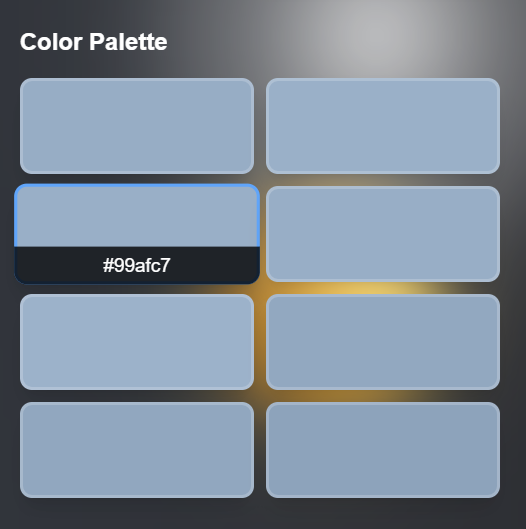
Keep clicking across different regions to gather several shades at once. Every pick is added to a panel that holds your selections together, which turns a single picture into a working color palette from image content. Sampling a highlight, a midtone, and a shadow from the same photo gives you a coherent group that already shares an underlying mood, which is far more reliable than assembling unrelated colors by hand. When you want to extract colors from image material for a full theme, this panel becomes your reference sheet, and you can copy any entry or the whole set into your project notes.
Why Extract Colors From Images?
The reason to extract colors from image files comes down to accuracy and speed. Many color decisions start from something that already exists: a logo a client emailed, a competitor page you want to study, a product photo, or a piece of reference art. In each case the color you need is sitting in front of you, but only as pixels, not as a code you can type. Sampling the pixel closes that gap directly.
There is also a consistency benefit. Once a value is recorded, every person on a project can apply the same shade without interpretation. A developer pastes the same hex a designer recorded, and a print vendor works from the same numbers a marketing lead approved. This shared reference prevents the slow drift that happens when colors are passed around by description. Finally, reading the value is simply faster than the alternatives. Eyeballing a shade in a color dialog rarely lands on the exact pixel, and full editing suites are heavy to open for a task this small. A focused tool that reads the color from image data and hands back a code keeps the job to a few clicks.
Supported Formats and Best Practices for Accuracy
The tool reads any raster image a browser can draw, which covers the formats you are most likely to have on hand:
- JPG and JPEG for camera photos and most downloaded images.
- PNG for screenshots, logos, and graphics with sharp edges or transparency.
- WebP for modern web images that balance quality and file size.
- GIF and BMP for older or simpler assets you may still encounter.
A few habits improve the values you read back. Prefer the original file over a resized copy, because scaling blends neighboring pixels and can shift a shade slightly. Be cautious with heavily compressed JPGs, since compression introduces faint speckles around edges and inside flat areas, so sample from the center of a solid region rather than along a boundary. Remember that screenshots already reflect any filter, brightness setting, or color profile applied when they were captured; the tool reports the pixel as it exists in the file, not the color the camera originally saw. For the steadiest reading on a textured or noisy area, sample two or three nearby points and compare, then keep the value that repeats.
Use Cases
Branding and Visual Identity
Brand work often begins with an asset and no documentation. A logo arrives as a flat image with no accompanying guide, or a color was approved on a printed sheet that was later scanned. Loading that asset and sampling each brand color produces the precise hex values a style guide should contain. Teams can also audit existing materials by checking whether a header or button on a live page matches the official shade, catching small mismatches before they spread across a site.
Web Development and CSS Styling
Front-end work frequently means translating a static mockup into code. When a design tool is not available or a value is missing from the handoff, a developer can load the exported mockup and read the codes directly. The hex and RGB outputs drop straight into stylesheet rules, while the HSL value is handy for building hover states and tints from a single base color by adjusting only its lightness. Using a color picker from image data keeps the implemented page faithful to the approved design rather than approximate.
Interior Design and Home Projects
A reference photo is a natural starting point for a room. When a particular wall tone or cabinet finish in a saved image is appealing, sampling that pixel produces a hex value that can guide a paint decision. Many paint counters now match custom colors from numeric input, so a photo can lead to a tin without relying on memory or a stack of swatch cards. This shortens the loop between finding inspiration and acting on it.
E-commerce and Product Photography
Online stores look more polished when surrounding design echoes the products on display. By sampling the dominant tones in a product photo, a team can choose background panels, accent buttons, and section dividers that sit comfortably next to the item rather than clashing with it. Consistent color choices across a listing reduce the visual jolt between a photo and the page around it, which helps the catalog feel intentional.
Social Media Content
Creators who want a recognizable feed benefit from repeating a small set of colors. Sampling shades from a photo that will be posted, then reusing those values for captions, text overlays, and template accents, ties a series of posts together without formal design training. The same approach helps when studying why a layout feels balanced, since reading its colors makes an intuitive impression concrete enough to repeat.
Features
Instant Sampling
Values appear the moment you click. Because the tool reads pixels from the image already drawn in your browser, there is no upload wait or processing spinner between the click and the result. After the first load, your connection speed no longer affects how quickly you can sample.
Three Formats at Once
Every pick reports hex, RGB, and HSL together. The hex form (such as #2563EB) suits stylesheets and design apps, the RGB form (such as rgb(37, 99, 235)) fits CSS functions and code, and the HSL form (such as hsl(221, 83%, 53%)) makes lightness and saturation easy to adjust. Having all three present removes the detour to a separate converter.
Palette Building
Selections gather into one panel so you can assemble a color palette from image material in a single pass. Each entry shows a swatch beside its codes, giving you a visual check and copyable text in the same place, and there is no cap on how many shades you collect.
Pixel-Level Precision
The magnifier exposes individual pixels as you hover, so you can target one point rather than a general area. This precision matters most on gradients and textures, where adjacent pixels may differ by only a few channel values and a careless click would grab the wrong one.
Nothing to Install
The whole tool runs in the browser as a free online color picker, with no application, extension, or account standing between you and the work. That makes it usable on restricted machines and mobile devices where installing software is impractical.
Client-Side Privacy
Your image is decoded and read inside the browser, not shipped to a server for analysis. Confidential mockups, unreleased product shots, and personal photos stay on your device for the entire session, which keeps sensitive material out of any external pipeline.
Broad Format Support
Any raster image the browser can render works here, including JPG, PNG, WebP, GIF, and BMP. A camera photo, a screenshot, a scanned page, or an exported design file can all be sampled without converting the file first.
Comparison With Other Tools
Several services can read a color from image data. The table below compares this tool with two common alternatives on the factors that affect everyday use: what it costs, whether you must register, which formats you get, and where your image is processed.
| Factor | FreeOnlineColorPicker | Full Editing Suite | Browser Extension Pickers |
|---|---|---|---|
| Cost | Free | Paid subscription | Free to low cost |
| Account Required | No | Usually | Sometimes |
| Color Formats | HEX, RGB, HSL | HEX, RGB, HSL, CMYK | HEX, RGB |
| Setup Needed | None, opens in browser | Install and license | Browser install |
| Where Image Is Processed | In your browser | On your computer | Varies by extension |
A full editing suite is the right choice when color sampling is one small part of heavy retouching or layout work. Extension pickers are convenient for grabbing a color from a live web page. This tool fills the middle ground: when you have a file in hand and want to get color from image data quickly, with codes in three formats and your image kept on your own device, it stays out of the way and finishes the task in a few clicks.
Frequently Asked Questions
Is the image color picker free to use?
Yes. The tool is a free online color picker with no fees, trial period, or paid tier. You can sample as many images and colors as you need without a charge.
Do I need to create an account?
No account or email is required. Open the page and start sampling right away. Because there is no login, there is nothing to verify and nothing to remember between visits.
Are my uploaded images sent to a server?
No. The image is decoded and read inside your browser, so the file stays on your device. This is helpful when you work with confidential mockups or unreleased material that should not leave your machine.
Which color formats does the tool provide?
Each pick reports hex, RGB, and HSL at the same time. As both a hex color picker and an rgb color picker, it covers the notations used in stylesheets, design apps, and code without a separate converter.
What image formats can I upload?
The tool reads any raster image the browser can render, including JPG, PNG, WebP, GIF, and BMP. You can sample a photo, a screenshot, or an exported design file without converting it first.
How do I sample one exact pixel?
Hover over the image to bring up the magnifier, which enlarges the area under your cursor. Center the loupe on the pixel you want and click. This lets you pick color from image regions inside gradients or textures without grabbing a neighbor.
Can I collect several colors from one image?
Yes. Keep clicking different areas, and each pick joins a panel, which builds a color palette from image material in a single pass. There is no limit on how many shades you gather.
Does it work on a phone or tablet?
Yes. As an online color picker, it runs in mobile browsers and adjusts its layout to the screen, so you can sample from a handset or tablet as well as a desktop.
Why might a sampled color look slightly off?
The tool reports the pixel exactly as stored in the file. Heavy compression, resizing, or a filter applied before saving can shift a shade, so sample from the center of a solid region and prefer the original file for the most reliable reading.
How do I save the codes I collect?
Use the copy control next to any value to place it on your clipboard, then paste it into your stylesheet, design file, or notes. To keep a full set, copy each entry from the palette panel into a document or your project style guide. This makes it simple to record a color code from image data for later use.
Advertisement
All Blog Posts
1Color Codes Explained: HEX, RGB, HSL & More
Learn color codes for beginners, including HEX, RGB, HSL, CMYK, and more. See examples and discover when to use each format.
2How Photographers Can Use Color Picking to Improve Their Workflow
Learn how photographers can use a colour picker to match tones, build palettes, improve editing, and create consistent color images faster.
3How to Read A Colour Chart: From RGB to Perfect Palettes
Learn how to read a color chart, understand RGB values, compare shades, build a color palette, and choose the right colors for any project.
4RGB vs HEX: Which Color Code Should You Use?
Learn the difference between RGB and HEX color codes, when to use each format, and how to convert between them for web and digital design.
55 Color Palette Ideas for Websites That Look Professional
Explore 5 professional color palette ideas for websites, with practical tips for choosing colors, using RGB values, and creating a polished design.
6HSL Color Picker: Complete Guide to Hue, Saturation, and Lightness
Learn how to use the HSL color picker to select colors by hue, saturation, and lightness. Understand the HSL color model, color wheel, and convert between HSL, hex, and RGB.
7Extract Colors From Image Online Free: Get Hex, RGB, HSL Codes Instantly
Extract colors from any image online for free. Get hex, RGB, and HSL color codes from photos, logos, and screenshots with our browser-based color extractor tool.
8Color Palette Generator From Image: Create Professional Palettes From Any Photo
Generate color palettes from any image with our free online tool. Extract dominant colors, build harmonious schemes, and export hex codes for your design projects.
9Online Color Picker: Free Tool for Hex, RGB, and HSL Color Codes
Use our free online color picker to select, convert, and copy hex, RGB, and HSL color codes. Works in any browser with no downloads or signup required.
10Custom Color Palette Creator: Build Unique Palettes From Scratch
Create custom color palettes from scratch using color theory principles. Build harmonious schemes for web design, branding, and creative projects with our free tool.
11Adobe Photoshop Color Picker: Complete Guide
Master the Adobe Photoshop color picker with our comprehensive guide. Learn advanced techniques for selecting, sampling, and managing colors in your design workflow.
12Complete Guide to Free Online Color Converters
Convert colors between hex, RGB, HSL, and other formats with free online color converters. Learn which tool is best for your design workflow.
13Create Beautiful Palettes Instantly
Generate beautiful color palettes instantly with our free tool. Get inspired by trending colors and create harmonious schemes for any project.
14Pick Color From Screenshot Online: Instant Hex & RGB Codes
Pick colors from any screenshot online and get instant hex and RGB codes. Perfect for designers who need to match colors from mockups and references.
15Pinetools Image Color Picker: Complete Guide
Discover how to use Pinetools image color picker effectively. Compare features with other tools and learn best practices for color extraction.
16RedKetchup Color Picker Tool: Complete Guide
Learn how to use the RedKetchup color picker tool for extracting colors from images. Complete guide with tips and alternative tools.
17RGB Color Code Generator: Complete Guide 2026
The ultimate RGB color code generator guide for 2026. Learn how to create, convert, and use RGB colors in modern web design and development.
Advertisement
Feedback
We'd love to hear your thoughts and suggestions! Your feedback helps us improve our tools.