Free Online Color Picker: Create Beautiful Palettes Instantly Without Any Design Experience
Introduction
Has it ever happened to you that you are sitting in front of a computer screen — whether it's a website, a presentation, or the walls of your room — and you just can't figure out which colors will look good together?
We all go through this phase. The truth is, choosing the right colors isn't just about picking what you like; it's about understanding how colors harmonize and the effect they create.
That's why I'm excited to tell you about a free online color picker that completely changed the way I design. You don't need to be a professional designer, you don't need to give your email, and there's no subscription — it's completely free.
Features of This Tool
Whether you're choosing brand colors for your small business, preparing a college report at 2 AM, or just want to give your Instagram post a professional look, this color palette generator will help you a lot.
No Account Needed
Start using it instantly without logging in.
Super Easy to Use
No heavy software to download or tutorials to watch.
Perfect Match
It suggests colors that look professional and soothing to the eyes.
Instead of spending hours struggling with colors, use this free tool and give your creativity a new identity.
What Makes a Great Online Palette Maker Free to Use?
Before we talk about the actual tool, let's discuss what you should actually look for when choosing a free palette generator tool. I have tried dozens of such tools over the past few years, and most of them fall into two categories — either they are so basic that they are of no use, or they are so complex that you need a design degree to understand them.

Qualities of an Effective Online Palette Maker
- Instant Results – Get direct results without any hassle or long process.
- Various Color Palettes – Options like HEX, RGB, and HSL should be available, because different projects require different codes.
- Easy Copy and Export – So you don't waste your valuable time and can directly use the colors.
- Beautiful Harmony – It should show you colors that actually look good together.
- No Hidden Fees – No registration or payment wall should come in between your work that stops your creativity.
The free color scheme generator I'm talking about meets all these standards, but the biggest thing is that this tool understands one basic fact — most of us don't want to become color theory experts, we just need colors that look good together and are stunning to look at.
Introducing the Ultimate Free Palette Tool Online
Let me introduce you to the Free Online Color Picker that's going to become your best friend very soon. This instant free palette creator is specially made for people who are working on real projects — not just for professional designers who only talk in terms of CMYK and Pantone.
How Does This Tool Work?
Let's understand step by step how it will save you hours of time.
Step 1: Go to the Tool
First, open the free palette generator. Notice what you don't see here: No email pop-up, no sign-up banner, no timer. You get direct and instant access. It respects both your creativity and your time.
Step 2: Generate Your First Palette
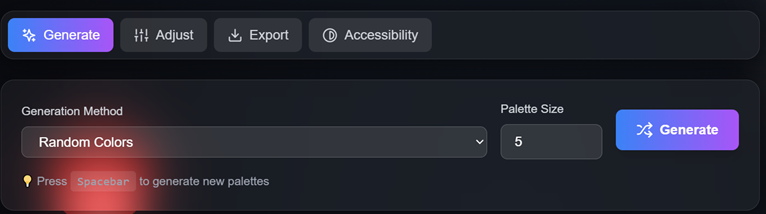
Click on the "Generate New Palette" button. Immediately, five stunning colors will appear with their HEX codes. If you don't like them, click again. You can do this as many times as you want — there's no limit like "three free generations per day."
Step 3: Understand Color Harmony Modes
Here you'll find three buttons that will give your design a professional look:
- Complementary – Colors opposite each other on the color wheel, creating high contrast.
- Analogous – Colors next to each other on the color wheel, giving a calm and balanced feel. Perfect for websites or bedroom walls.
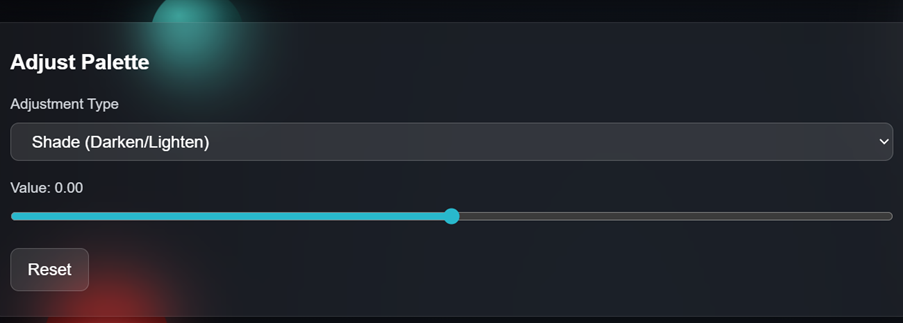
- Monochromatic – Different shades of the same color, giving a classy and elegant look. The tool automatically adjusts brightness and saturation.
Step 4: Copy and Use Colors
My favorite part: click on any color, and its HEX code is instantly copied. No right-click hassle, no text selection trouble. Just click and paste into your design file or PowerPoint.
Step 5: Experiment Until It's Right
There's no right or wrong answer in color selection — only what feels right for your project. With this tool, you can fearlessly try 10, 20, or 50 palettes.
Pro Tips: Getting the Most from Your Color Palette Tool
After years of experience, I've learned some things that will take your use of an online color palette generator from ordinary to spectacular.
1. Start with Your Base Color
If you already have a color you don't want to change — like your company logo or a shade you love — make that your starting point. The free color scheme generator shows random colors at first, but you can keep clicking until you find the shade you like, and then build the rest of the palette from there.
2. Keep Context in Mind
Colors behave differently depending on where they're used. A color that looks beautiful on a laptop screen might look completely different on a phone or when printed on paper. This no-sign-up palette generator lets you quickly test many combinations to see how they'll look in different places.
3. Understand Emotions and Purposes
Every color has its own psychological effect:
- Blue symbolizes peace and trust (banks and social media sites use it a lot).
- Red shows energy and urgency.
- Green gives a feeling of nature and calm.
When using this free online palette tool, don't just look at beauty — think about the emotion you want to evoke.
4. Save Your Favorite Palette
When you find a palette you like, take a screenshot or write down the HEX codes immediately. Sometimes in excitement, you might accidentally click "Generate" again and lose the palette forever — don't let that happen to you.
5. Check Accessibility
Make sure your colors have enough contrast so that text is readable on the background. Many free online contrast checkers are available that will tell you if your text can be read easily by everyone, including people with visual impairments.
The Psychology Behind Your Color Choices
Let's understand this a little more deeply — when you use this free color scheme generator, you're not just picking pretty colors, you're making a psychological decision that influences people's emotions and reactions.
1. Blue
- Message: Trust, stability, professionalism
- Feeling: Calming and soothing
- Caution: Too much blue can feel a bit cold
When you choose blue palettes with this tool, you're showing reliability.
2. Red
- Message: Energy, passion, urgency
- Feeling: Increases heart rate and grabs attention immediately
- Use: A red palette says, "Look at me now!"
3. Green
- Message: Nature, growth, health, harmony
- Feeling: Easy on the eyes, balanced and refreshing
Green palettes feel soothing and natural.
4. Yellow
- Message: Optimism, clarity, warmth
- Feeling: Can be irritating if used wrongly, may look cheap
- Tip: Use the right shade of yellow to enhance beauty instead of causing strain.
5. Purple
- Message: Luxury, creativity, wisdom
- Feeling: Rare in nature, so it feels special and premium
Understanding these color associations will help you make better decisions while using the free online color picker. You'll be crafting an emotional experience for people, not just picking random colors.
Conclusion
Choosing the right colors is no longer as difficult as solving a puzzle. As we've seen, design isn't just about looking beautiful — it's about sending the right message and evoking the right emotions. Whether you want to win trust with blue or spark excitement with red, you now have all the information that can turn an ordinary project into something extraordinary.
The best part is, you don't need expensive software or years of experience for this. This free online palette generator has made the world of design easy for everyone. Now you can create professional-level color palettes in seconds without any email registration or fees.
Remember, a good design always starts with a good color choice, and now this tool is always with you to help you get that start. Don't limit your creativity — experiment with colors, try different modes, and keep trying until you find the perfect combination that touches your heart.
Your perfect palette is just a click away. What are you waiting for?
Ready to create stunning color combinations? Try the Free Online Palette Generator now and discover your perfect colors in seconds.
Frequently Asked Questions (FAQs)
1. How does a free online color picker work differently from paid design software?
A free online color picker works directly in your browser without downloads and focuses specifically on color harmony through automatic algorithms, while paid software like Adobe requires manual navigation and deep technical knowledge—the free palette generator tool trades advanced features for simplicity, making it perfect for most projects where you can create palettes online free without expensive licenses or learning curves.
2. Can I use colors from a free palette generator for my commercial business or client projects?
Yes, colors from a free online palette generator are free for any use including commercial projects since individual colors can't be copyrighted (except rare trademarked colors), so your free color palette creator combinations can confidently be applied in websites, marketing materials, logos, or products without legal worries or licensing fees.
3. Why do some color palettes look great on screen but terrible when printed?
Screens use RGB (light-based) while printers use CMYK (ink-based), so when you create palettes online free, vibrant screen colors may not translate perfectly to print because RGB has a wider color range—the instant free palette creator gives perfect HEX codes for digital projects, but test physical samples first for printed materials.
4. What's the difference between complementary, analogous, and monochromatic color schemes in a free color scheme generator?
Complementary colors (opposite on color wheel) create maximum contrast and energy, analogous colors (neighbors on wheel) create peaceful harmony, and monochromatic schemes (one color's variations) create sophisticated elegance—experimenting with these modes in your online palette maker free tool helps match color relationships to your project's emotional goals.
5. How many colors should I use from my palette generator free tool in a single project?
Follow the 60-30-10 rule: dominant color 60%, secondary 30%, accent 10%—while your free palette generator gives five colors, focusing on 2-3 main colors from your online color palette generator creates cleaner designs than using all five equally, treating the full palette as options for different applications.
6. Is it better to choose bright, saturated colors or muted, desaturated colors from my online palette tool?
Bright saturated colors grab attention and feel energetic (perfect for children's products or buttons) while muted colors convey sophistication (ideal for luxury brands), so use your online color picker tool to generate palettes then apply muted versions for backgrounds and saturated versions for accents based on your industry needs.
7. Can a free palette tool online help me if I'm colorblind or creating designs for colorblind users?
A free online color picker provides a starting point, but after generating palettes pair colors with icons and labels, run them through colorblind simulators, and ensure your free color scheme generator selections have sufficient contrast in lightness (not just hue) which benefits everyone's accessibility.
8. How do I know if my free color palette online will look good on both dark mode and light mode interfaces?
Generate two complementary palettes where you create palettes online free keeping primary colors consistent but adjusting saturation and brightness, especially for text—manually test your free palette tool online colors since most palette generator free tools don't automatically account for dark mode variations.
9. What's the best way to maintain brand consistency when using multiple free color tool options across different projects?
Save all HEX codes in a brand style guide with usage rules, then reference this document for every project rather than generating new palettes—always work from exact HEX codes since different color palette tool options render colors differently, ensuring consistency builds brand recognition faster than variety.
10. Why do some free palette generator tools show five colors while others show more or fewer?
Five colors from a free online palette generator is a practical sweet spot including one dominant, supporting, and accent colors providing variety without overwhelming choices—the online palette maker free tool understands that constraint breeds creativity better than too many options.
11. How often should I update my color palette when using a free color scheme generator for my brand or project?
For established brands consistency matters more than trends since color recognition builds over time, but for project-based work refresh colors quarterly—if rebranding use an online palette tool to explore new directions but consider gradual evolution (keeping primary colors while updating accents) rather than complete overhauls.
12. Can I create accessible color combinations using a no signup palette generator, and what does accessibility actually mean?
Accessibility means ensuring everyone can read your content—after selecting colors with your free palette tool online use a contrast checker (4.5:1 minimum for text), don't rely solely on color by adding icons and labels, and ensure variety in both hue AND lightness.
13. What should I do if my favorite color doesn't appear when using the online color picker tool's automatic generation?
Keep clicking the palette generator free tool until finding a similar shade, or use it to understand color relationships by generating complementary, analogous, or monochromatic palettes around your chosen color—the color palette tool teaches principles you can apply independently.
14. How do cultural differences affect color meanings, and should I use different palettes from my free online palette generator for international audiences?
White symbolizes purity in Western cultures but mourning in Asian cultures, red signals danger in some countries but luck in China—research target markets since a free palette tool online can't account for cultural context, and adjust which color is dominant versus accent for different regions.
15. If I'm not a designer, how do I know when a palette from the online palette maker free tool actually looks "good" versus just "okay"?
A good palette should feel effortless—test by squinting (elements maintain hierarchy), converting to grayscale (still works), and walking away then returning—if people engage with content without consciously thinking about colors, your free color scheme generator helped create functional design that just works.