Free Online Color Code Generator: Create HEX, RGB, HSL, and CMYK Color Systems
Table of Content
- What Is a Color Code Generator
- How to Use the Color Code Generator
- Understanding Color Formats
- Shades, Tints, and Tones
- Color Harmonies
- Accessibility and Contrast Checking
- Use Cases
- Features
- Frequently Asked Questions
What Is a Color Code Generator
A color code generator is a browser tool that takes a single color and expands it into a complete set of related values. From one starting color it produces the equivalent codes in several formats, a range of lighter and darker variations, a group of matching colors based on color theory, and a readability check for text. The goal is to give you everything you need to build a consistent color system instead of a single isolated value.
It helps to understand how this differs from a basic color picker. A color picker lets you choose a shade and read its code, and that is where its job ends. A generator continues past that point. After you enter a color it converts the value into a hex color code, an rgb color code, an hsl color, and a CMYK value, then derives the surrounding family of colors. A picker answers the question of which color you selected, while a generator answers what to do with that color across an entire design.
This matters because most real projects need more than one color. A website needs a background, body text, links, buttons, and hover states. A brand needs a primary color along with supporting tones that work together. Calculating these relationships by hand is slow and easy to get wrong. The generator performs the same arithmetic the same way every time, so the color palette you build on screen matches the values you copy into your project.
How to Use the Color Code Generator
The tool is built to give you a full set of results from a single input. Each step below adds another layer of information, starting with a color and ending with a complete, accessible scheme.
Step 1: Enter Your Color
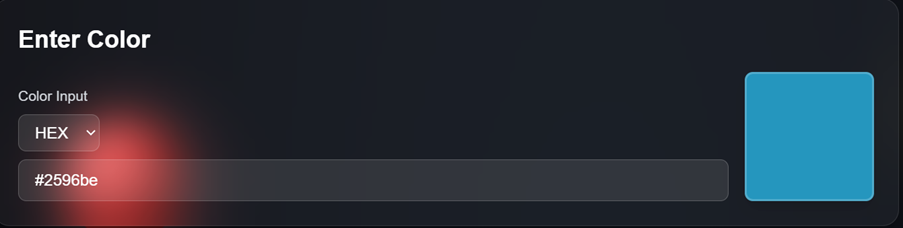
Begin by entering a color in the input field. You can type a hex color code such as #3B82F6, with or without the leading hash symbol, or use the visual picker to select a shade directly. As you enter the value, the preview updates so you can confirm the color is correct before moving on. There is no submit button and nothing to load, so the result appears as soon as you provide a valid color.
Step 2: View the Format Conversions
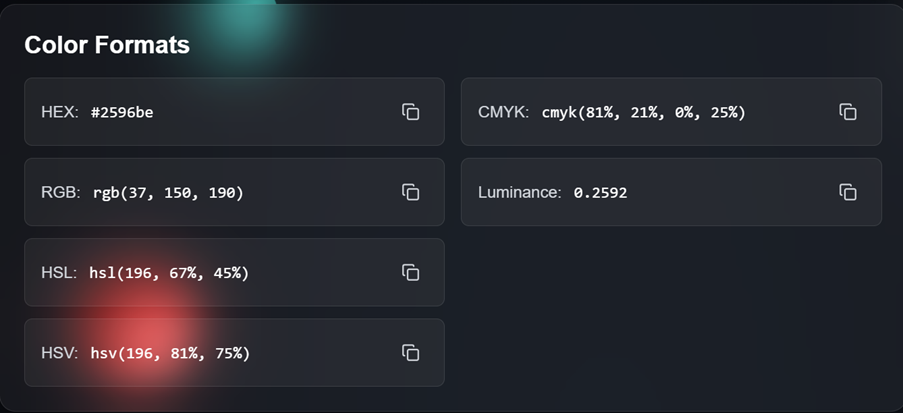
Once a color is entered, the tool converts it into every supported format at the same time. You see the value as a hex color code, an rgb color code, an hsl color, and a CMYK value, with each code paired with a copy button. This removes the need to retype values or run a separate color converter, and it avoids the typing mistakes that can occur when copying codes by hand. Whether you need hex for a stylesheet or CMYK for a print file, the correct value is ready to copy.
Step 3: Generate Shades and Tints
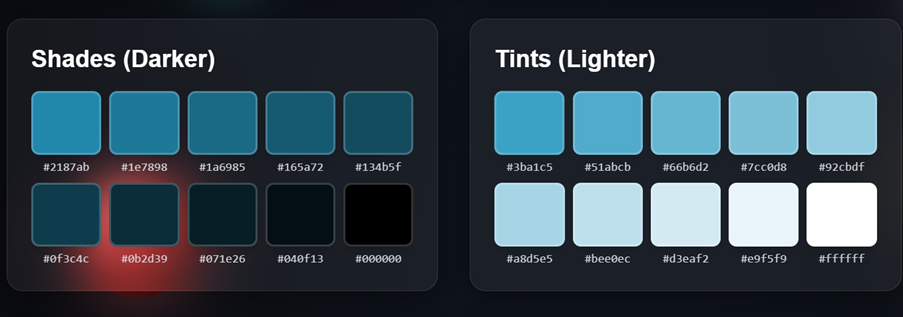
Below the conversions you will find a range of lighter and darker versions of your color. These shades and tints are not random. Each darker shade is produced by blending the base color toward black, and each lighter tint is produced by blending it toward white, in even steps. The result is a smooth gradient of related values that you can use for backgrounds, borders, and hover states. Selecting any variation makes it the new base color, so the rest of the tool updates to match.
Step 4: Explore Color Harmonies
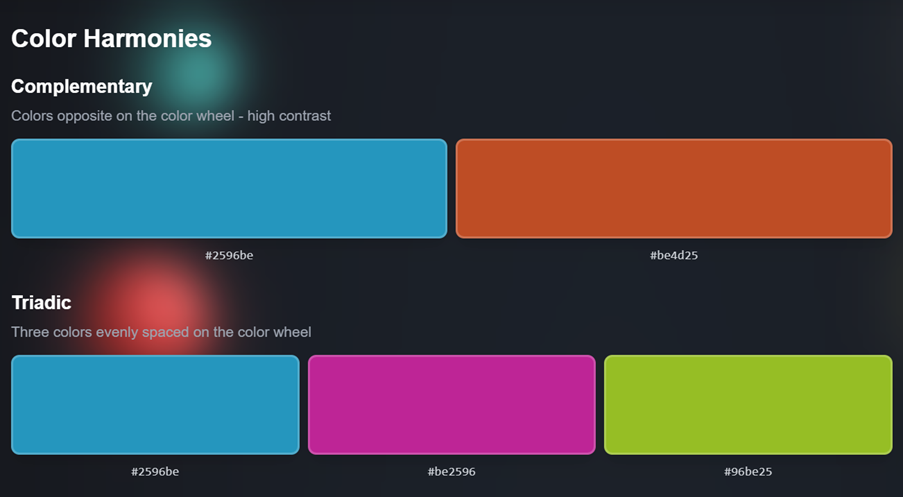
The tool also suggests colors that pair well with your starting value. Each color harmony is based on the position of colors on the color wheel. You can see complementary colors taken from the opposite side of the wheel for strong contrast, along with analogous, triadic, split-complementary, and tetradic groups for softer or more varied combinations. Selecting a suggested color copies its code or sets it as the new base, which lets you explore one direction at a time without losing your place.
Step 5: Check the Contrast
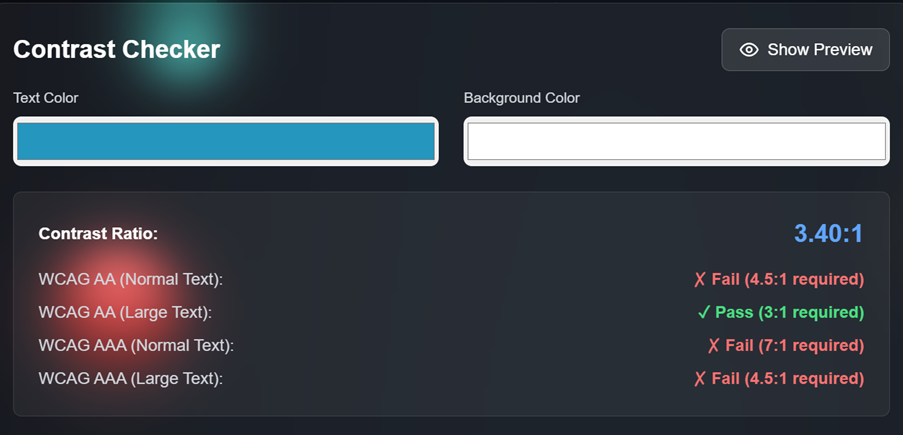
The final step confirms that your color choices are readable. Enter a background color and a text color, and the built-in contrast checker reports the ratio between them along with a pass or fail result for accessibility standards. This tells you whether light or dark text works better on a given background and helps you adjust a shade before the design reaches users. Together, these five steps turn one color into a documented, readable scheme.
Understanding Color Formats
A color can be written in several notations, and each one is suited to a different task. Knowing what each format describes helps you decide which value to copy for a given project.
HEX
A hex color code is a six-digit value written after a hash symbol, such as #3B82F6. The six digits form three pairs that describe the red, green, and blue components, and each pair ranges from 00 to FF, which is 0 to 255 in decimal. Hex is compact and is the most common way to write colors in HTML and CSS, which makes it the default choice for web work.
RGB
An rgb color code describes a color through three channels, written as rgb(59, 130, 246). Each channel holds a value from 0 to 255. RGB is an additive model, which means the channels add light together: all three at 255 produce white, and all three at 0 produce black. Because screens emit light, RGB maps closely to how monitors and phones display color, and it is convenient for scripting and canvas work.
HSL
An hsl color is described by hue, saturation, and lightness, written as hsl(217, 91%, 60%). Hue is an angle from 0 to 360 degrees on the color wheel, saturation is a percentage that controls how vivid the color is, and lightness is a percentage from black to white. HSL is easy for people to reason about, because adjusting one value changes a single understandable property rather than mixing three channels at once. This makes it useful for building variations.
CMYK
CMYK describes color with four ink channels: cyan, magenta, yellow, and key, where key is black. Each channel is a percentage from 0 to 100. CMYK is a subtractive model, because inks absorb light rather than emit it, so adding more ink produces a darker result. It is the standard for commercial printing, which is why a complete color workflow includes a CMYK value alongside the screen formats.
Shades, Tints, and Tones
The terms shade, tint, and tone describe three ways to vary a base color, and each is produced by mixing the color with a neutral value:
- Shades are made by mixing the base color with black, which lowers its lightness and produces darker versions.
- Tints are made by mixing the base color with white, which raises its lightness and produces lighter versions.
- Tones are made by mixing the base color with gray, which reduces its saturation and produces a more muted version.
The generator builds these variations in even steps, so the difference between one swatch and the next stays consistent across the range. This produces a natural gradient rather than a set of unrelated colors. A single base color can then supply a light tint for a page background, a mid-range value for accents, and a dark shade for text, all drawn from the same source. Working with shades and tints in this way keeps a design unified, since every value shares the same underlying hue.
Color Harmonies
A color harmony is a group of colors that work well together because of their positions on the color wheel. The generator calculates several harmony types from your base color, each with a different balance of contrast and similarity. The table below summarizes the main types and where each one fits.
| Harmony Type | How It Is Formed | Typical Use |
|---|---|---|
| Complementary | Two colors on opposite sides of the wheel | Strong contrast and clear focal points |
| Analogous | Colors that sit next to each other on the wheel | Calm, cohesive designs |
| Triadic | Three colors spaced evenly around the wheel | Balanced schemes with variety |
| Split-Complementary | A base color plus the two neighbors of its complement | Contrast with less tension than complementary |
| Tetradic | Two complementary pairs forming a rectangle | Rich schemes with one dominant color |
Complementary colors create the most contrast and suit a design that needs a clear point of emphasis, such as a call-to-action button against a calmer background. Analogous schemes are gentler and read as a single mood. Triadic and tetradic schemes provide more variety but usually work best when one color leads and the others support it. The generator presents each option so you can compare them with your own base color rather than relying on theory alone.
Accessibility and Contrast Checking
Color choices affect whether content can be read by everyone, including people with low vision or color vision differences. Contrast ratio measures the difference in luminance between a text color and its background, expressed as a value from 1:1 to 21:1. A higher ratio means the text stands out more clearly from the background.
The Web Content Accessibility Guidelines, known as WCAG, set target ratios for readable text. The built-in contrast checker compares two colors and reports the ratio against these levels:
- AA for normal text requires a ratio of at least 4.5:1.
- AA for large text requires a ratio of at least 3:1, where large text is roughly 18.66 pixels bold or 24 pixels regular.
- AAA for normal text requires a ratio of at least 7:1 for the highest level of readability.
- AAA for large text requires a ratio of at least 4.5:1.
By checking a pair of colors before they go live, you can confirm that body text, links, and labels meet the level you are aiming for. If a combination falls short, you can switch to a darker shade or a lighter tint from the same color family and test again until it passes. Meeting these standards improves the experience for all readers and helps a site comply with common accessibility requirements.
Use Cases
Building a Brand Color System
A brand often starts with a single primary color and needs a full system built around it. Entering that color into the generator produces the supporting values: lighter tints for backgrounds, darker shades for text, and a set of harmony colors for accents. Because every value is reported as a hex color code and an rgb color code, the same system can be documented for both digital and print use, which keeps the brand consistent across materials.
Web Development
In web development, a single base color rarely covers every interface state. A button needs a default color, a hover color, and sometimes a disabled color. The shades and tints generated from one value supply these states while keeping them visually related. Copying the result as an hsl color makes later adjustments straightforward, since lightness can be changed without altering the hue.
UI and Interface Design
When designing an interface, readability and balance are central. A designer can choose a base color, generate a color palette of supporting tones, and then run each text-and-background pairing through the contrast checker to confirm it is legible. This combines the creative step of selecting colors with the practical step of verifying them, so the finished interface is both coherent and accessible.
Features
The generator brings several related functions together in one place:
- Multi-format conversion that reports each color as a hex color code, an rgb color code, an hsl color, and a CMYK value at the same time, working as a built-in color converter.
- Shade and tint generation that produces a range of lighter and darker variations in even steps from the base color.
- Color harmony suggestions for complementary, analogous, triadic, split-complementary, and tetradic groups.
- A contrast checker that reports the ratio between two colors and compares it against WCAG AA and AAA levels.
- One-click copy buttons on every code, so values move into a stylesheet or design file without retyping.
- Real-time updates that recalculate every result as soon as the base color changes, with no submit step.
- In-browser processing that performs all calculations on your device, with no account required to use the tool.
Frequently Asked Questions
What is the difference between a color code generator and a color picker?
A color picker lets you select a color and read its code. A color code generator goes further by converting that color into several formats, creating lighter and darker variations, suggesting matching colors, and checking readability. A picker tells you the color, while a generator helps you build a complete scheme around it.
Which color formats does the generator support?
The tool reports each color as a hex color code, an rgb color code, an hsl color, and a CMYK value. All four are calculated at the same time, so you can copy whichever format your project needs.
Do I need an account to use the tool?
No. The generator runs in your browser with no sign-up and no software to install. You can open it, enter a color, and copy the results right away.
How are shades and tints calculated?
Darker shades are produced by blending the base color toward black, and lighter tints are produced by blending it toward white, in even steps. This method keeps the variations related to the original color and creates a smooth gradient of shades and tints.
What do the color harmony types mean?
Each color harmony is a group of colors chosen by their positions on the color wheel. Complementary colors sit opposite each other, analogous colors sit next to each other, and triadic, split-complementary, and tetradic groups use evenly spaced positions. Each type offers a different balance of contrast and similarity.
What are complementary colors used for?
Complementary colors come from opposite sides of the color wheel and create strong contrast. They work well when a design needs a clear focal point, such as an accent button placed against a calmer background color.
Why does the contrast ratio matter?
The contrast ratio measures the luminance difference between text and its background. A higher ratio makes text easier to read, especially for people with low vision. The contrast checker compares your colors against WCAG levels so you can confirm the text is legible before publishing.
What contrast ratio should I aim for?
For normal body text, aim for a ratio of at least 4.5:1 to meet WCAG AA, or 7:1 to meet the stricter AAA level. Large text can use lower ratios, with 3:1 for AA and 4.5:1 for AAA.
Can I use the generated colors for print?
Yes. Each color includes a CMYK value, which is the format used for commercial printing. Keep in mind that printers cover a smaller range of colors than screens, so a printed proof is the most reliable way to confirm a color before a full run.
Does the generator replace a separate color converter?
For most tasks, yes. Because the tool reports every format at once, it works as a built-in color converter while also providing variations, harmonies, and a readability check. You can build an entire color palette from a single starting value without switching tools.