The Ultimate Guide to Color Picker from Website: Extract Brand Colors Instantly (No Design Degree Required)
Introduction
When you're browsing online and suddenly a website's color combo hits you. Like a deep blue that's professional yet friendly, or a coral shade that's classy and cool. But then the struggle starts—"How do I get this color?"
We've all been there, staring at screens, thinking, "This one's bluish-green, maybe with a hint of grey?"
Here's the thing, guys—every color online has a secret code, like a digital fingerprint. And I'm gonna show you how to crack it with a Color Picker tool that'll change how you work forever.
Why Color Codes Matter More Than You Think
Imagine you're building a website for a new business, or a big presentation for work. Or, designing a best friend's wedding card—you want it "wow", professional, classy.
Thing is, people miss this: what makes stuff go from okay to stunning? Right color. "Close enough" doesn't cut it. You need that EXACT color you saw somewhere.
That's where Hex Color Picker becomes your choice—a Google Translate for colors. Every color on screen's got a code—HEX or RGB. With this code, no guesswork. You nail that vibe and sparkle.
The Traditional Way
Before I knew about color picker online tools, my color-matching process looked something like this:
- Take a screenshot of the website
- Open it in some heavy design software (Photoshop).
- Zoom in like crazy.
- Try aiming the Eyedropper tool at the color. Pray the screenshot's quality didn't mess it up.
- Find out it did. Sigh.
Biggest issue with this? Screenshots compress images, messing with color shades and sparkle. When you need 100% accuracy, this method drops.
The Free Online Color Picker: Your Ultimate Color Matching Tool
This is where things get easy. With a legit image color picker, you can grab exact color codes from any photo or website in seconds. No guesswork, no "close enough"—just 100% accuracy, every time.
I personally use https://freeonlinecolorpicker.com/ Biggest plus? Super simple. No downloads, no account hassle. Just open, pick, and go.
This is how it works:
How to Extract Colors Using an Online Color Picker
Method 1: Uploading an Image
Got an old screenshot, a brand logo pic, or maybe a sunset shot with that perfect orange? Just upload it. The color palette generator so smooth—it'll grab the exact color code wherever you click. Just aim and get the code.
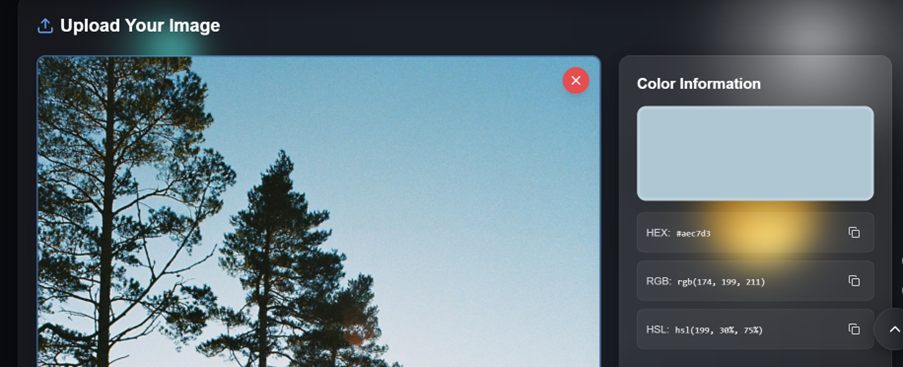
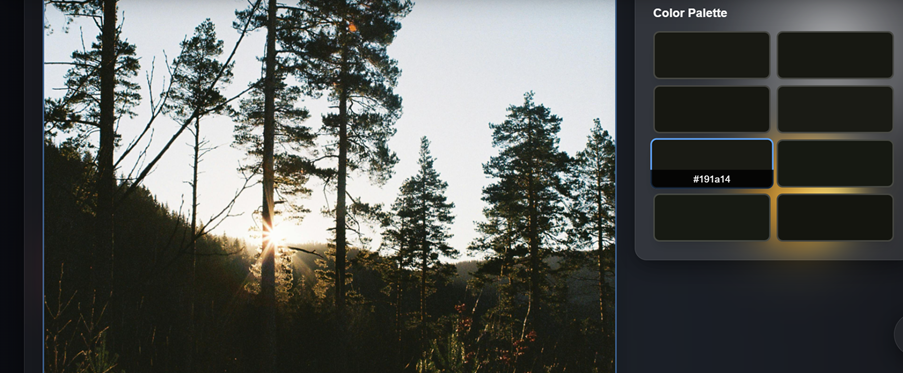
Method 2: Pick Color Directly from Screen
This one's my fav—real magic! Some tools let you pick color from screen online. No downloads, no uploads. Website, old design file, video call bg—grab that teal (or whatever). Just drag cursor, get code.
Understanding Different Color Code Formats
HEX Color Codes Explained
HEX codes look like #FF5733. They're called HEX because they use hexadecimal (base-16) counting. The first two characters represent red, the middle two are green, and the last two are blue.
Why do designers love HEX? Because it's compact, universally supported, and when you pick hex color from image online, you can drop it directly into CSS, HTML, or pretty much any design tool.
RGB Color Codes Explained
RGB works with numbers from 0-255 for Red, Green, and Blue. So that same color might be rgb(255, 87, 51). When you use an rgb color picker, you're getting values that are super intuitive—higher numbers mean more of that color.
HTML & CSS Color Usage
When you use an html color picker, you're typically working with HEX codes, since that's the standard for web development. But here's a pro tip: modern CSS also accepts RGB, HSL, and even color names like "tomato" or "cornflowerblue" (yes, really).
Privacy Matters: Picking Colors Without Uploading Images
One important thing—privacy. Working with client or brand assets that aren't public yet? Uploading to random sites can feel risky, right? Data leak fears kick in.
That's where "color picker from website without upload" features save the day. Smart tools do everything in-browser—your image never leaves your computer. Huge relief for freelancers/agencies where privacy's top priority. Work worry-free.
My Step-by-Step Process for Color Extraction
After doing this roughly a thousand times, here's my refined workflow:
Step 1: Capture What Inspires You
See a color you love? Screenshot it, photograph it, or save the image. Don't trust your memory—that "perfect" color you saw yesterday will be impossible to recreate from memory.
Step 2: Use a Proper Tool
Open your hex color picker online tool. I keep it bookmarked because I use it constantly.
Step 3: Extract Multiple Colors
Don't just grab one color. When you extract colors from image online free, grab 3-5 that work together. This gives you a ready-made palette.
Step 4: Test in Context
Colors look different depending on what's around them. That gorgeous purple might look totally different on a white background versus a dark one.
Step 5: Save Everything
Keep a document or note with all your color codes. Future you will thank present you when you need "that perfect green" six months from now.
Common Mistakes People Make with Color Pickers
- Trusting your eyes too much—human memory's iffy with colors. Use color palette from image online tools for exact codes.
- Forgetting screen settings—same color ≠ same look across devices. Stick to standard codes.
- Accessibility issues—low contrast = hard to read. Think contrast, not just "classy".
- Using too many colors—3-5 max, else it gets chaotic.
Pro Tips for Smarter Color Usage
Create Mood-Based Color Collections
I keep different color palettes for different vibes: "Energetic & Fun," "Calm & Professional," "Bold & Edgy." When starting a new project, I have a head start instead of staring at a blank canvas.
- Organizing palettes by emotion and purpose—group colors by the feeling they evoke, not just by hue.
Learn the Basics of Color Psychology
Blue builds trust (that's why banks love it). Red creates urgency (hello, sale banners). Green feels natural and calming. When you pick hex color from image online, think about the emotion you want to convey.
- How colors influence decisions and trust—understand the psychological impact of your color choices.
Build a Personal Color Swipe File
See an amazing color combination? Save it. I have a folder full of screenshots from websites, photos, and designs that inspire me. My image to hex color tool turns that inspiration into actionable codes whenever I need them.
- Turning inspiration into reusable assets—build a library of colors you can reference anytime.
Features That Define a Great Online Color Picker
Lots of tools out there, but not all are useful. If you're hunting for a top color picker online, make sure it has these 6 things:
- Spot-on Accuracy: Get exact colors, or it's pointless.
- Multiple Formats: HEX, RGB, HSL—whatever you need.
- Super Easy to Use: One-click simplicity.
- No Downloads: Browser-based = no fuss.
- Privacy-Friendly: No uploading files to servers.
- Totally Free: Why pay when it's free?
Troubleshooting Common Color Picker Issues
"The color looks different on my phone" Screens display colors differently. Use your hex color picker to ensure you're using the exact same code, but accept that perfect consistency across all devices is impossible.
"I extracted the color, but it looks wrong in my design" Context matters. A color that looks great on one background might look terrible on another. Always test your colors in your actual design environment.
"The tool won't let me pick colors from certain websites" Some websites have protections against automated tools. In those cases, take a screenshot first, then use your image color picker online on the screenshot.
The Future of Color Picking
Technology keeps getting better. Some newer tools are adding AI features that can:
- Suggest complementary colors based on what you've picked
- Generate entire palettes from a single color
- Adjust colors for accessibility automatically
- Even predict color trends
But honestly? Sometimes the simple tools are the best. A straightforward color picker from website that just works without fuss will always have a place in my toolkit.
Conclusion
Look, I know talking about color codes might seem nerdy or overly technical. But here's why I genuinely care about this:
Good design shouldn't be gatekept behind expensive software or years of training. With a free online color palette generator, anyone can create professional-looking work. The teenager starting their first online business. The teacher making engaging presentations. The parent designing their kid's birthday invitation.
Color pickers democratize design. And that's beautiful.
Your Color Journey Starts Now
Ready to stop guessing and start knowing? Here's your mission:
- Bookmark https://freeonlinecolorpicker.com/ right now (seriously, do it)
- Find three websites with colors you admire
- Extract their color codes using the tool
- Create your first color palette for your next project
- Actually use it (this is where most people stop—don't be most people)
Remember: every expert started exactly where you are now. The only difference? They picked up their tools and started using them. Today, that tool is a color extractor. Tomorrow, who knows what you'll create?
The colors are out there, waiting for you to discover them. All you need is the right tool and the courage to experiment. So go ahead—extract that perfect color, build that stunning palette, and create something that makes people stop scrolling and think, "Wow, that looks amazing."
Because it will.
Frequently Asked Questions
1. What is a color picker and how does it work?
A color picker is a tool that identifies and extracts exact color codes from images, websites, or screens. It works by analyzing the digital color information at a specific pixel location and converting it into usable formats like HEX, RGB, or HTML color codes.
2. How can I pick hex color from image online for free?
You can pick hex color from image online by using free tools like freeonlinecolorpicker.com. Simply upload your image, click on any color you want to extract, and the tool will instantly provide you with the HEX code that you can copy and use anywhere.
3. Is it possible to get color code from image online without downloading software?
Yes! You can get color code from image online using browser-based tools that require no downloads or installations. These online color pickers work directly in your web browser, making them accessible from any device.
4. How do I extract colors from image online free?
To extract colors from image online free, visit a color picker website, upload your image (or paste a URL), and click on the colors you want to extract. The tool will provide you with all the color codes, often allowing you to build an entire palette from a single image.
5. What's the difference between a hex color picker and an RGB color picker?
A hex color picker provides colors in hexadecimal format (like #FF5733), while an rgb color picker gives values in red-green-blue format (like rgb(255, 87, 51)). Both represent the same colors, just in different formats. Most modern tools provide both formats simultaneously.
6. Can I use a color picker from website without upload for privacy?
Yes, many modern tools offer a color picker from website without upload feature that processes everything locally in your browser. This means your images never leave your computer, making it perfect for handling sensitive or confidential design work.
7. What is an online color palette from image and why is it useful?
An online color palette from image is a collection of colors automatically extracted from a photo or graphic. It's useful because it gives you a pre-coordinated set of colors that already work well together, saving you time and ensuring color harmony in your designs.
8. How do I pick color from screen online in real-time?
To pick color from screen online, some tools offer a color dropper feature that lets you click anywhere on your screen to capture colors. However, most web-based tools work better when you take a screenshot first and then upload it to the color picker.
9. What's the best way to use an html color picker from image for web development?
An html color picker from image is perfect for web developers. Extract the HEX or RGB codes from design mockups or inspiration images, then paste them directly into your CSS. This ensures your website matches your design vision exactly.
10. Can a color palette generator help me create a cohesive brand identity?
Absolutely! A color palette generator can extract multiple coordinating colors from a single inspirational image, helping you build a cohesive brand identity. Use it to analyze competitor colors or extract palettes from photos that match your brand's mood and values.
11. How accurate are online color picker tools compared to professional software?
Modern color picker online tools are extremely accurate and provide the same color codes as professional software like Photoshop. The key is ensuring your source image is high quality and hasn't been compressed or color-shifted by screenshots or downloads.
12. What's the easiest way to convert image to hex color codes?
The easiest way to image to hex color is using a free online tool: upload your image, click on the desired color, and copy the HEX code that appears. Most tools also let you extract multiple colors at once to build a complete palette.
13. Can I use a color extractor for competitor analysis?
Yes! A color extractor is perfect for analyzing competitor websites and marketing materials. You can identify exact colors they use, understand color trends in your industry, and make informed decisions about your own color strategy (while creating your own unique palette, of course).
14. What's the benefit of a hex color picker online versus a desktop application?
A hex color picker online requires no installation, works on any device with a browser, is usually free, and stays up-to-date automatically. Desktop applications might offer more features, but for most users, online tools provide everything needed without the hassle.
15. How do I build a color palette from image online for my next project?
To build a color palette from image online, upload an inspiration image to a color picker tool, extract 3-5 colors that represent your desired mood, test them together in your design, and save the codes for future use. Look for colors that appear frequently in the image for the best harmony.